
housesitter
ExperimentalA $100 KVM beside your agents’ Mac. When the Mac restarts, it unlocks FileVault. When it can’t, it tells you. And the Mac and its KVM watch each other.
npx github:ourostack/housesitter demo
Its own NPU reads your Mac’s clock, so a clock that stops reads as stopped.
We pressed Restart on our Mac mini and touched nothing else. The KVM saw FileVault through the Mac’s own HDMI port, recognised the prompt it had been taught on the restart before, and typed once, by itself: 70 seconds from Restart to desktop.
The smart plug is next: follow it.

It reads the clock on the KVM’s own NPU
A frozen Mac and a busy one both stop answering. The clock tells them apart: if it still moves, a power cycle would only hurt. housesitter used to compare a fingerprint of the clock’s pixels, and the KVM’s video noise changed it in 74 of 89 live pairs of looks taken within the same minute. Now a 414,690-weight model on the Comet’s neural processor reads the time itself.
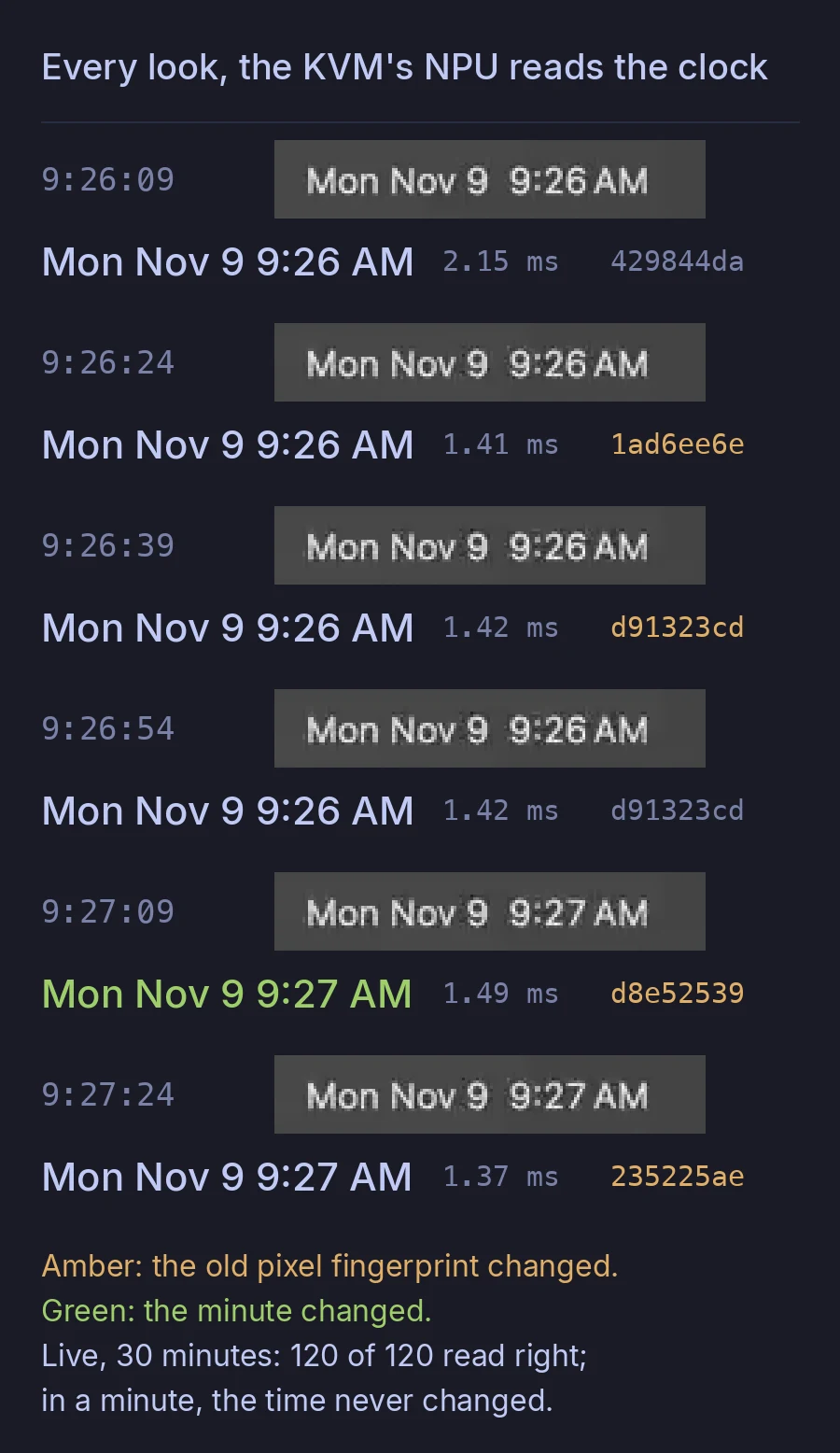

- 1.42 msa read on the NPU, median of 120 live looks
- 120 of 120menu-bar times read right, live, over 30 minutes
- 66 of 66lock-screen and FileVault clocks read right, on recorded frames with 30 different times
- 2.2 MBof the KVM’s contiguous memory for both models; about 37 MB of RAM
It only feeds the frozen-clock test: it never decides what’s on the screen and never leads to typing. If the NPU fails, the sitter turns it off for an hour and falls back. GL.iNet ships the NPU’s IOMMU off, so every job timed out until the worker learned to bind Rockchip’s contiguous-memory heap in a mount namespace of its own. The models learned from synthetic menu bars and lock screens drawn with open fonts. It’s one Comet and one Mac so far, and no real freeze yet. On old 960-wide recordings it read 69 of 113 clocks exactly; the live sitter reads full 2560×1440 frames.
From the sitter’s log and the KVM’s frames
- 22:55:55Restart, pressed by our agent: the only touch.
- 22:56:01The Mac shuts down.
- 22:56:24The screen went dark, then the Mac found the KVM’s keyboard again: a boot.
- 22:56:44FileVault, the prompt it was taught on the restart before, steady for six looks: now it may type.
- 22:56:51Typed the password, once, by itself.
- 22:57:06The desktop, 70 seconds after Restart.
Why I built it
If your agents live on a Mac with FileVault, every restart (an update, a power blip, a panic) stops at the password screen until someone types. A smart plug can’t type. A KVM can, if you’re awake. Here’s how we found out.
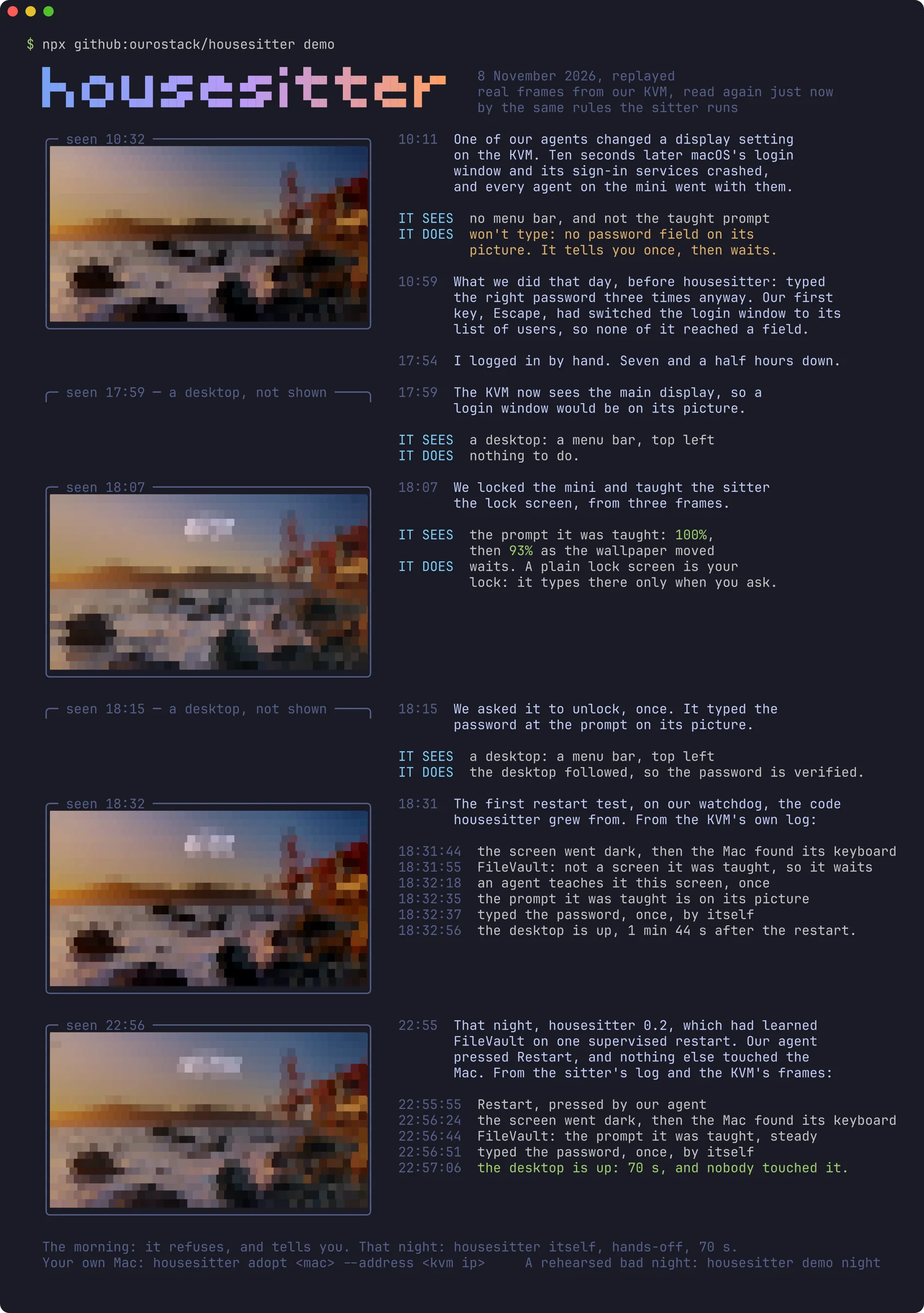
On Sunday morning one of our agents changed a display setting on the KVM beside our Mac mini. Ten seconds later macOS’s login window and its sign-in services crashed, and every agent on the mini went down with them. We typed the right password through the KVM three times, and none of it reached a password field.
Our first key was Escape. At a macOS login window, Escape switches to the list of users, where no field has focus. And the display the KVM was watching didn’t show the field at all. The mini sat locked from 10:11 until I logged in by hand at 17:54.
So housesitter types only where it sees the password prompt on its own picture, and never presses Escape. That morning it would have refused and sent me one message. That night we put housesitter’s own sitter on the KVM. The first restart we watched: it refused the FileVault screen, because it had never seen it, so we taught it that screen once, and its one supervised try reached the desktop. After that we only pressed Restart. It saw the boot, recognised FileVault and typed once, and on housesitter 0.2 the desktop was back 70 seconds after Restart, with nobody touching it.
housesitter doctor
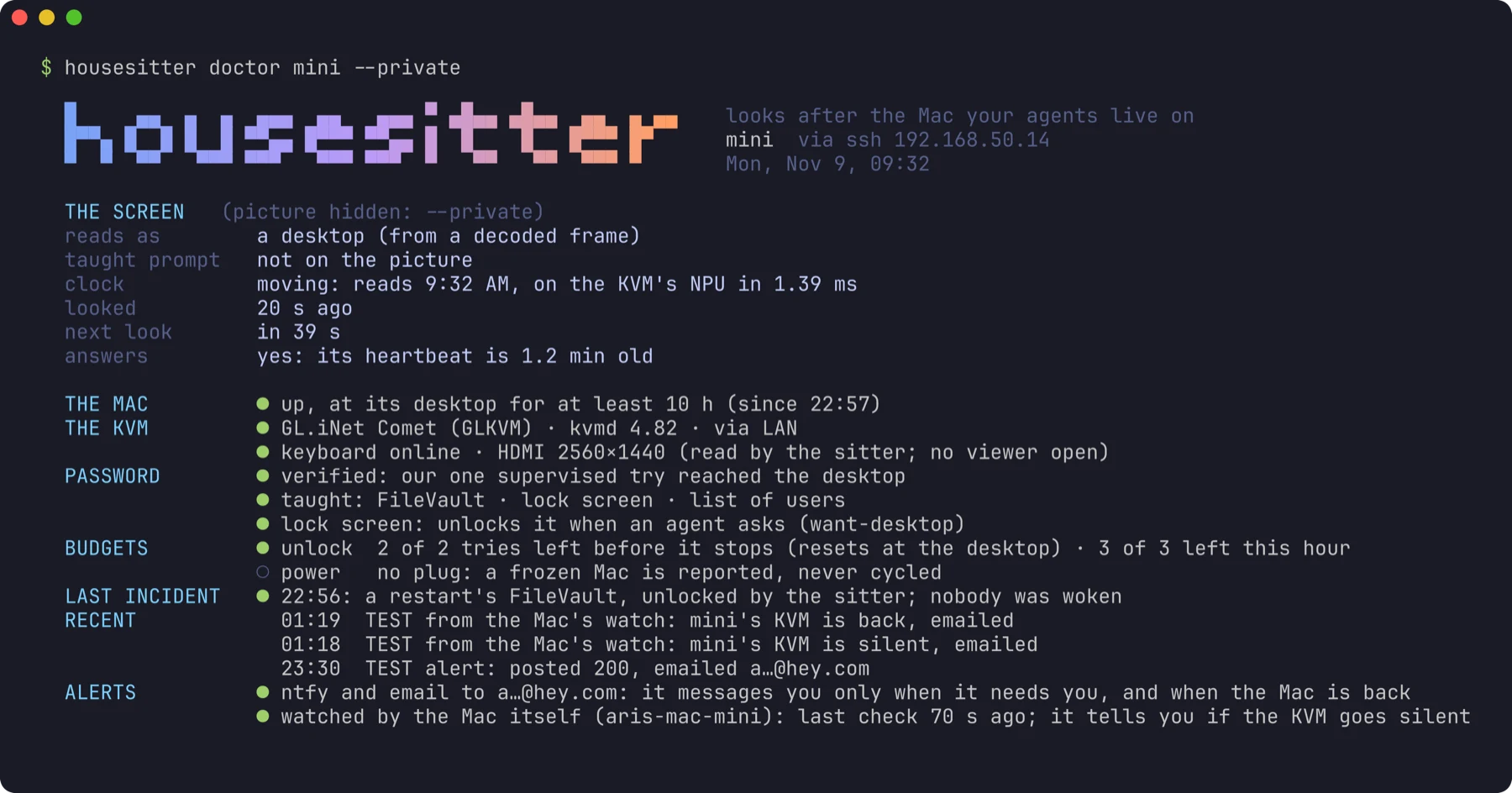
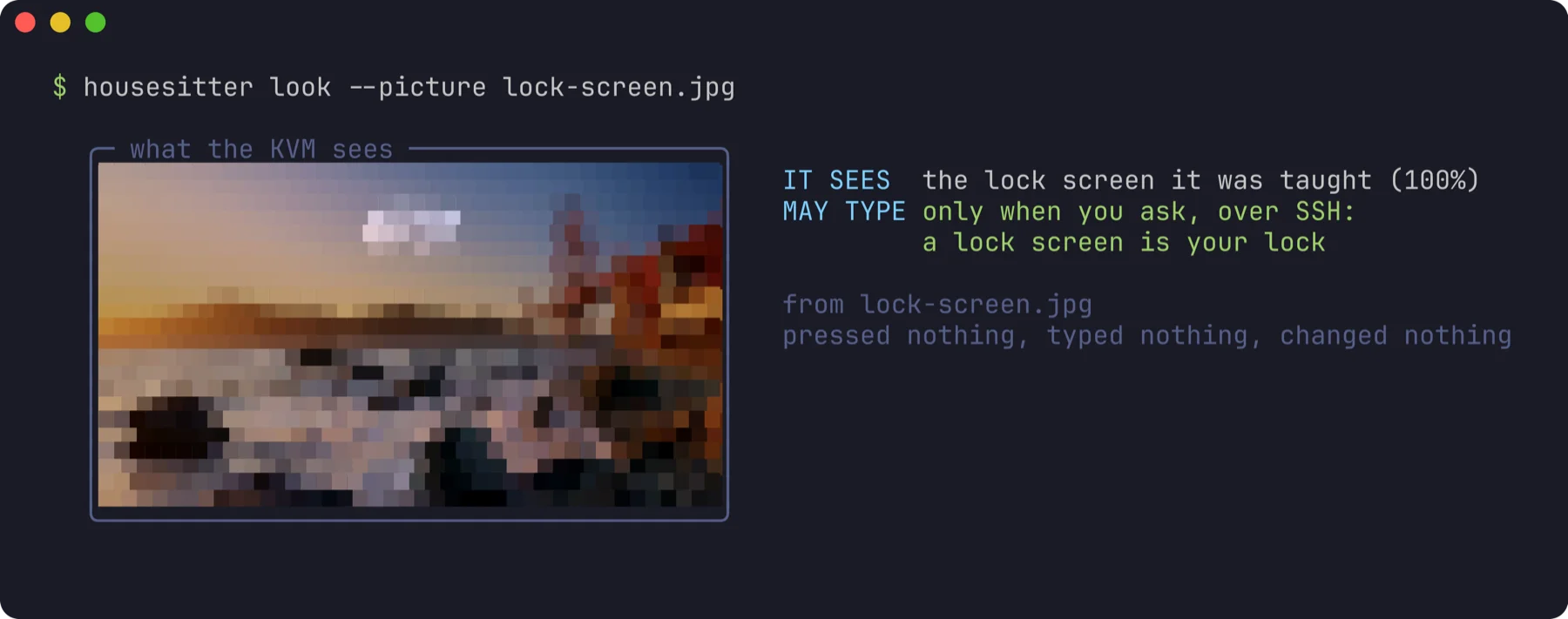
Everything the sitter knows on one screen, with the command for anything missing. The picture is 40 by 22 pixels of the KVM’s own, too small to read anything on.
The day, replayed
housesitter demo replays that Sunday in your terminal: real frames from our KVM, read again just now by the rules the sitter runs, then that day’s two restarts. In the morning’s frame there’s no password field, so it refuses and tells you. In the evening our watchdog, on the same rules, needs teaching once; that night housesitter 0.2 unlocks a restart hands-off, in 70 seconds.
npx github:ourostack/housesitter demo
A bad night

housesitter demo night rehearses a bad night, all fakes, and each incident tests one rule. A panic: it types at FileVault, once. A freeze: three more looks before the plug goes off. A password someone changed: two tries, then one message, and never a third.
HEY Imbox · from ntfy.sh 23:30
🏠 TEST: mini is stuck at FileVault
TEST (housesitter alert-test; nothing is wrong). Seen by the housesitter on its KVM.
Stuck because: at the FileVault screen for 10+ min and the sitter has not unlocked it. Look: housesitter status mini.
What it does
Unlocks FileVault after a restart
Types the password at the FileVault screen you taught it, and only there, once you’ve armed and verified it; three times an hour at most. Your lock screen stays yours.
Reads the Mac’s clock on the KVM’s NPU
A small model on the Comet’s own neural processor reads the time in the menu bar, and on the lock screen and FileVault, so a frozen Mac reads as frozen. It only feeds that test; it never leads to typing.
Power-cycles a frozen Mac
Built, not yet tried on a real plug. With a smart plug on its cord, only a desktop frozen for 5 minutes that nothing answers for, confirmed by three more looks. Never at a boot or a login.
Tells you only when it needs you
One message when it’s stuck, saying what to fix, a reminder every six hours at most, and “back” when the Mac is.
The Mac watches its KVM
A dead KVM can’t message you, so the Mac does. Every minute it checks on the sitter; after 5 quiet minutes (about 8 after the KVM’s last look) it tells you once, and again when the KVM is back. No outside service.
Your agents get the same eyes and hands: screenshots from before login, and click, type and key on the desktop, over your tailnet or LAN, in Anthropic’s computer-use actions as-is.
Why not just…
A smart plug?
It restarts the Mac straight into the FileVault screen, where it waits for you.
A PiKVM, or any KVM?
You can type the password from your phone, once you notice, if you’re awake. housesitter is that KVM, with nobody needing to notice.
macOS 26’s SSH unlock?
Use it if you can. It needs Remote Login on and the network up before boot, and it can’t help a Mac whose login window crashed.
Three cables, then one restart
- 1
HDMI from the Mac’s own port into the KVM, so it sees the screen.
- 2
USB-C from the KVM into a port on the Mac itself, so it can type at the FileVault screen.
- 3
Ethernet for the KVM, so you reach it over your tailnet or LAN.
Then, on the agent Mac, with Node 20 or later:
npm install -g github:ourostack/housesitter
housesitter secret studio mac-password
housesitter adopt studio --address 192.168.1.50 --this-mac --notify ntfy
housesitter watch-kvm studio --install adopt sets the KVM’s admin password, turns its API on, checks the picture and the keyboard, installs the sitter, seals the Mac’s password on the KVM, and makes a private ntfy topic for your phone, where the sitter says hello before it finishes (add --email and an ntfy.sh account token to get each message as an email too); watch-kvm --install has the Mac check on the KVM every minute, so you hear if the KVM itself goes quiet. Then, once, while you watch: arm one try with housesitter unlock --trial and restart. At the FileVault screen it waits, because it hasn’t seen that screen before; teach it with housesitter learn-prompt --filevault and it types its one try within seconds. If that try reaches the desktop, it may type by itself from then on.
On the Mac, once: sudo pmset -a autorestart 1 displaysleep 0 sleep 0, and start your agents at login, so they come back when the Mac does. Built against the GL.iNet Comet PoE, about $100; a Shelly plug for a frozen Mac is about $25 more. At home the KVM’s SSH and HTTPS are unfiltered, so keep it behind your router; elsewhere, --location away lets in only your tailnet.
Careful with the password
- It types only where the password prompt is on the KVM’s own picture: read with OCR, or matched against the prompt you taught it from three frames at the FileVault screen (on our mini, the avatar and name just above the field). That lesson matches every FileVault frame of our restart and never the lock screen or a bare wallpaper. A desktop is a hard no, and so is a prompt on another display.
- Agents click, press keys and type only on a desktop, read fresh from the KVM’s picture. At a password screen, only the sitter types.
- Typing ships disarmed. A stored password is unverified until one supervised try reaches the desktop; a new password starts over, and a desktop appearing on its own never counts.
- The password lives in two places: your Keychain and the KVM, sealed and root-only. Never in argv, a log, a gist or a cloud. Nothing types it remotely.
- Whoever has root on the KVM, or the Mac and the KVM stolen together, has the password. Keep the KVM where the Mac is, on a network you trust.
- It never changes the KVM’s EDID or the Mac’s display mode. Doing that once crashed our mini’s login window.
- On your tailnet the KVM is tag:kvm and reaches nothing. GL.iNet’s cloud binding is off, and read back as off.
- At home only your LAN’s private addresses and the tailnet reach the KVM’s SSH and web page; away from home, only the tailnet. The sitter reads its rules back every 5 minutes and puts them back if they changed.
What’s verified
Done on a real Mac
FileVault after a restart, hands-off, by housesitter 0.2: Mac mini (M5 Pro) and GL.iNet Comet, 70 seconds from Restart to desktop. In the KVM’s own access log of those minutes, the only key and click events are the Restart clicks and the sitter’s three keys; the rest are video sessions, whose contents kvmd doesn’t log, and the log we publish is an extract (see the proof). Earlier that night, on 0.1, we taught it the FileVault screen once and proved its password, then it did the same hands-off in 79 seconds.
Run on real hardware
housesitter doctor, look and status, read-only, against that Comet. It found a real bug, now fixed with a test.
Done on a real Mac, too
When an agent needs the UI, if you allow it: housesitter unlocked the lock screen in 9 seconds, and the login window’s list of users in 16, clicking the account’s tile first.
Sent for real
One TEST alert, end to end: the sitter’s own rules decided a Mac stuck at FileVault and sent that exact message, marked TEST. With --email it reached our HEY Imbox 2 seconds later.
Done on a real Mac, both ways
The Mac watching its KVM: we stopped only the sitter on our Comet at 01:13 on 9 November, with the quiet limit cut from 5 minutes to 2 for the test. Four minutes and 44 seconds later the mini sent “TEST: mini’s KVM is silent”, in our HEY Imbox 2 seconds after; we started the sitter again, and “back” came 34 seconds later. At the default 5, expect the message about 8 minutes after the KVM’s last look.
Run on real hardware
The clock read on the KVM’s NPU, by housesitter 0.3 on 9 November: 120 of 120 menu-bar reads right over 30 minutes, median 1.42 ms a read; and 66 of 66 lock-screen and FileVault clocks on recorded frames, by a second model.
Run on real hardware
Who can reach the KVM, by housesitter 0.3.2 on 9 November: with away mode on, nothing answered over our LAN from two machines while the tailnet did, and 94 seconds later the sitter’s own recheck put home mode back.
Next
The smart plug, which arrives 9 November.
Not yet
A real freeze and a power cut; a message from a real refusal (none has happened yet); a macOS update; OCR beyond English macOS.
Part by part ↗ The restart’s evidence, and what it can’t show ↗